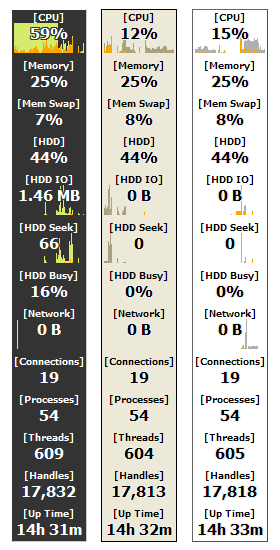
| رصد أداء الحاسوب الخاص بك Moo0 نظام المراقبة يسمح لك بصرك على استخدامات الموارد في نظام الكمبيوتر الخاص بك. انها تدعم حاليا 43 نوعا من المعلومات بما في ذلك وحدة المعالجة المركزية ، الذاكرة ، والشبكة ، ومفصلة الأعراف الأقراص الصلبة. باستخدام هذا البرنامج ، قد تكتشف ما هو الحد من أداء النظام الخاص بك في كل مناسبة. تلميحات : Wondering about the Skins? - You can check them out here. - يمكنك تقليص عرض عن طريق النقر المزدوج فوقه. - أيضا ، يمكنك تغيير حجمه من خلال التمرير الأوسط زر. - يمكنك تعليق التلقائي إخفاء وظيفة عن طريق الضغط على مفتاح التغيير.
المراجعات:
الروسية تنقيحالدعم كان ممكنا بفضلMax حقا بفضل الكثير | ||||||||
| عنوان الصفحة: | |||||||||
| رابط الصفحة: | |||||||||
| HTML Tag: | |||||||||
| اللغة: | البيلوروسية, Bulgarian, البرتغالية البرازيلية, الصينية المبسطة, الصينية التقليدية, التشيكية, الدانماركية, الهولندية, الانجليزية, الفرنسية, الألمانية, Greek, الهنغارية, الايطالية, اليابانية, الكورية, Polish, الروسية, Serbian (Cyrillic), Serbian (Latin), الأسبانية, Swedish, التركية, 16 other languages (Partial) - [ المترجمون (45) ] | ||||||||
| OS: | Windows XP/Vista/7/8.1/10 | سهولة الاستخدام: | سهل | ||||||
| الاصدار: | 1.83 | ||||||||
| اخر تحديث: | 2019/06/15 [ تاريخ التحديث (64) ] | ||||||||
| PAD File: | [ if you are running software listing site... ] | ||||||||
| تنزيل: |
| ||||||||
| حجم: | 4.67 MB | ||||||||
| الترخيص: | مجاني (استخدام غير التجاري فقط) تستخدم في مكان العمل / مقهى للإنترنت؟
| ||||||||
| التعليقات: | |||||||||
| أسئلة وأجوبة: | ■ (Symptom) The program suddenly doesn't start up one day? stopped working properly? on Windows 10/8.1? This probably happens when "Windows SmartScreen" hinders our program from working. In this case, please try the following before the installation. 1. Before the installation, right-click on the installer file and open the file "Property". 2. At the bottom of "General" tab, if you see "Security: This file came from another computer...", select "Unblock" check box, and "Apply" and "OK". 3. If you install the program after it, it may be able to prevent many problems caused by "Windows SmartScreen" or some other security products. Or, you can actually turn off this problematic feature of Windows itself: (only if you feel too troublesome to do this every single time.) https://ugetfix.com/ask/how-to-disable-windows-smartscreen/ This happens to every software vendor who doesn't or can't donate $300 to Microsoft every single year (EV signature purchase), and especially when the program file is still new. This kind of problems started to get reported since the early of 2019. (Symptom) Error message: "Unknown locale of Windows" / Some field values always stay as 0. / It freezes. / It takes long time to start up. Please generate an error report file through "About -> Generate Error Report File.." menu and check the lines under [Performance Counter Objects]. If there is any data under it, please send the file to us. We can support your system using the information. If there is nothing under it, it means your performance monitoring mechanism has been corrupted by some other programs. (It is well known that many old programs keep breaking the mechanism.) In the case it's been broken, you may try to fix it as referred here: How to manually rebuild Performance Counter Library values (Symptom) "CPU Temperature" field always shows "-----". The CPU temperature field currently supports recent Intel and AMD processors only. If your CPU temperature field is always "-----", please try one of "Temp1-3" fields. Which changes most actively is usually CPU temperature. Also, if your CPU is very recent, but "CPU Temperature" fields doesn't work, please generate an error report file through "About -> Generate Error Report File.." and send it to us. We'll see what we can do. (Symptom) It uses lots of CPU on Windows 7 running on Virtual PC. It's because Virtual PC doesn't support hosting Windows 7 yet. Even if you turn off SystemMonitor, Windows Task Manger will then use lots of CPU instead. You simply need to wait for Virtual PC to support Winwdows 7. (VMware has no problem of such.) | ||||||||
| المراجعات: |
Japanese) 「Moo0 システムモニター」 - 好みのスキン、サイズ、レイアウトにより、CPU使用率、CPU温度、HDD温度、起動時間などのシステム情報を表示できる自由度の高いデスクトップソフト (フリーソフト100)
Japanese) Moo0 システムモニター 1.32 - システムリソースの使用度を一覧で確認できる、視認性のよいシステムモニタ (Vector) Moo0 SystemMonitor Keeps an Eye on Your System Resources (Lifehacker) | ||||||||
 System Performance Monitor